The context
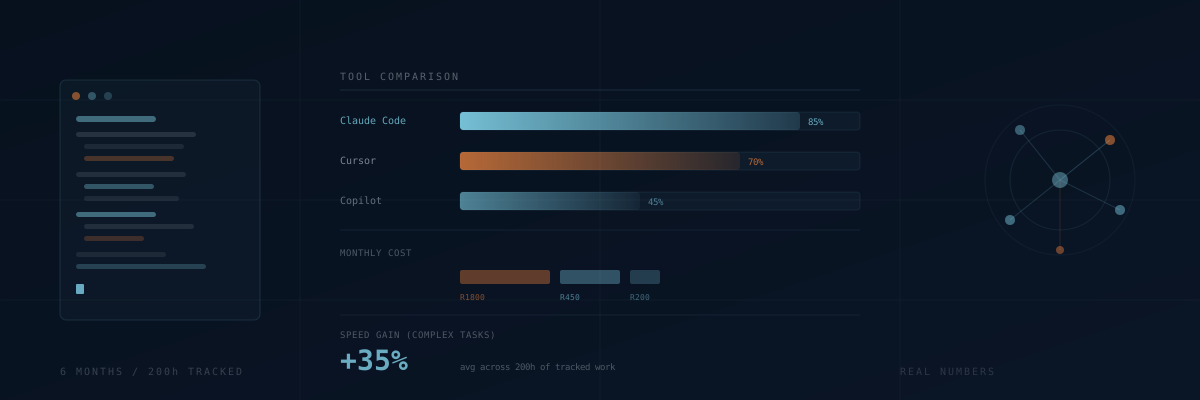
We are a small agency. The three tools we are comparing are Claude Code (via the CLI, billed per token), Cursor (R450/month at time of writing, USD 20), and GitHub Copilot (R200/month, USD 10). We have used all three on projects ranging from WordPress customisation to full custom PHP applications to the health scanner we wrote about separately.
We are not doing synthetic benchmarks here. We are reporting what we actually observed over roughly 200 hours of billable work where an AI tool was active.
Claude Code
What it is good at
Multi-file tasks. When we need to refactor a module, update a component that touches 8 files, or implement a feature end to end, Claude Code is significantly faster than anything else we have tried. It can hold the context of a medium-sized codebase in one session and make changes that are consistent across files without us having to re-explain the pattern each time.
It is also the best at understanding existing code. We used it to onboard into a legacy WordPress codebase we inherited from a previous agency. The client could not tell us how half of it worked. We pasted chunks into Claude Code and asked it to explain, then used that understanding to safely extend the code without breaking anything.
What it gets wrong
Cost is the main one. A heavy session (full codebase exploration, multi-file edits, back-and-forth debugging) can cost R30-80 in tokens. Over a month of regular use we spent about R1,800 on token costs. That is more than Cursor. For a team doing 8 hours a day of Claude Code, the cost would be significant.
It also hallucinates library APIs on occasion. Less than GPT-4, but it still happens. We always verify function signatures against actual docs before accepting suggestions for external libraries we have not used before.
Cursor
What it is good at
It is the most polished editor experience. If you are already a VS Code user, the transition is zero friction. The inline completions are good, the codebase-aware chat is genuinely useful, and the tab completion for boilerplate is fast enough that it becomes invisible, which is the best compliment you can give a tool like this.
For day-to-day coding where you are mostly writing new code in a familiar codebase, Cursor is probably the best value tool available. At R450/month flat it is predictable, and for a dev who is using it all day, the productivity gain easily covers the cost.
What it gets wrong
Large context tasks. When we need to reason about how 20 files interact and make a coordinated change, Cursor starts to struggle. It often loses track of constraints established earlier in the conversation. We end up re-explaining things we already told it. For this class of problem we switch to Claude Code.
Cursor also goes down occasionally. We had two incidents over 6 months where the service was unavailable for 2-4 hours during business hours. For a tool you are relying on, that is noticeable.
GitHub Copilot
What it is good at
Autocomplete. The line and block completion is still excellent, and it is the least intrusive of the three. It does not try to take over; it makes suggestions and gets out of the way. For developers who want a productivity assist without changing their workflow, Copilot is the easiest recommendation.
At R200/month it is also the cheapest. If you are not doing complex multi-file work and just want faster boilerplate and better autocomplete, it is hard to argue against it.
What it gets wrong
Everything that requires understanding the broader codebase. Copilot does not have deep context awareness. It completes based on what is in the current file and a small window of nearby files. For building new features in an existing system, it is the weakest of the three.
Its chat interface has improved but it is still clearly behind Claude Code and Cursor for complex questions. We use it for autocomplete and use one of the other tools for anything that requires actual reasoning.
How we use them together
The honest answer is that we use all three in combination:
- Claude Code for new features, large refactors, debugging across multiple files, and onboarding into unfamiliar codebases.
- Cursor as the day-to-day editor for active development, with its inline completions and codebase chat for quick questions.
- Copilot disabled in favour of Cursor's completions, which are consistently better in our experience.
Total monthly cost per developer on the team: roughly R2,200 (Cursor R450, Claude tokens R1,800 averaged). That sounds like a lot but our billable rate is R1,200/hour. If the tools save two billable hours per month, they are paying for themselves.
In practice they save considerably more than that. Our rough estimate is 25-35% faster on tasks that benefit from AI assistance. The qualifier matters: not all tasks benefit. Pure logic debugging, performance profiling, and anything requiring domain knowledge the model does not have are still human-hours.
The honest take
None of these tools replace understanding the code. They all produce plausible-looking code that is sometimes wrong in subtle ways. The developer using them still has to understand what the code does, review the output, and catch the mistakes. What they save is the typing, the pattern-recall, and the context-switching overhead. That is real value, but it is not magic.